 Your Name Inbox
Adding your domain email to a phone or computer
Last reviewed
The quick version
- Get your settings from your email provider first.
- A mail app often finds the rest itself.
- If it can't, you type the incoming and outgoing servers.
What to have ready
Your provider's help pages list your settings. Collect them before you begin. Apple tells you to make sure you know the email settings for your account.[1]
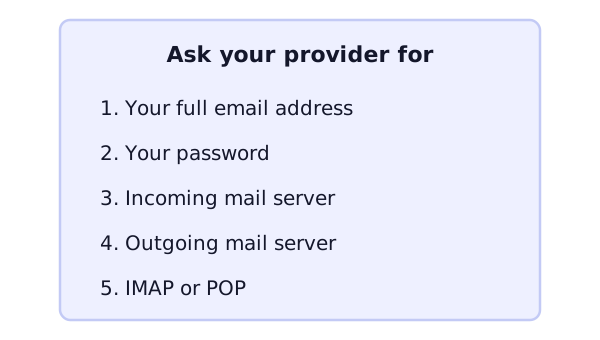
The real values come from your provider. They are different for each one, so this page can't list them for you.
Webmail needs no setup
You can also skip apps. Webmail is mail you read in a web browser.[2] Open your provider's sign-in page, enter your address and password, and you're in. An app is only for people who want mail on their phone's home screen or in a desktop program.
Example: the Mail app on an iPhone
This is one app. Others, like Outlook, have different screens, but the same ideas.
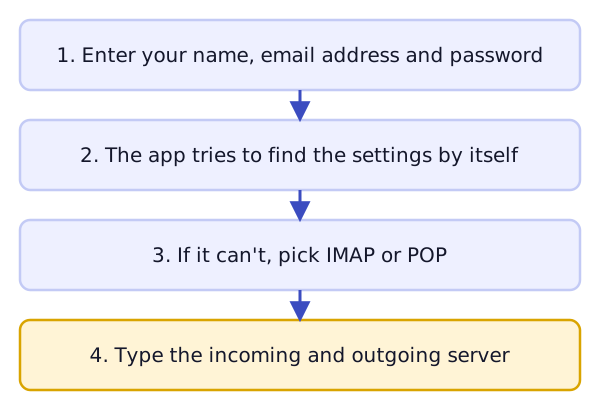
If your provider is a common one. Apple says Mail can set up some accounts with just your email address and password.[1] Apple gives iCloud, Google, Microsoft Exchange and Yahoo as examples.[1] Pick your provider from the list if it's there.
If you set it up by hand. In Apple's steps you go to Settings, then tap Apps. Tap Mail, then Mail Accounts, then Add Account.[1] Then you tap Add Other Account, then Mail Account.[1] You enter your name, address, password and a short description.
Mail then tries to find the settings and finish the setup.[1]
If Mail can't find them. You choose IMAP or POP for the new account.[1] Then you fill in the incoming and outgoing mail servers.[1] If you don't have those, Apple says to contact your email provider.[1]
The IMAP choice is explained in IMAP, POP3 and SMTP.
After it's added
Send a test message to yourself. Then send one from a different address to your new one. Check that both arrive. Do it on each device you set up.
If something fails, look at the settings first. Check each server name letter by letter.
What's next
Moving from one email provider to another has its own list of jobs. See switching email providers.
Sources
- Add an email account to your iPhone or iPad, Apple Support (accessed 2026-11-03)
- Webmail, Wikipedia (accessed 2026-11-03)